How to Keep 20+ Interior Design Projects On Track With Better Visibility
Interior design delivery is rarely blocked by creativity. It’s blocked by coordination. Studios run many projects in parallel and designers split their week across multiple clients, and work jumps between phases that require different skills.
Most studios don’t have a good system for coordinating all of that. Delivery gets managed through a mix of spreadsheets, slide decks and emails. It works until it doesn’t, and design teams often run into capacity bottlenecks that could have been avoided.
This post shows how these challenges can be solved with simple resource management software. Over the past years, we’ve worked closely with studios to translate their day-to-day needs into a small set of views and workflows that provide the needed visibility.
The reality in interior design delivery
Our conversations with studios have revealed the following key challenges:
Too many projects, too little overview: Many studios run 20 or more projects at the same time, and each designer is involved in multiple projects in parallel. That makes it difficult to keep track of who is doing what and which milestones are coming up on each project. When the overview is missing, it’s easy to miss early warning signs until a deadline is already close.
Coordination depends on availability you can’t see: Design delivery requires close coordination between people: quick decisions, handoffs, reviews and alignment with others. But without knowing who is supporting a particular project and when those people are available, coordination becomes difficult. This gets even harder when the team is not all in one place.
People become reactive when visibility is low: A successful project needs initiative by the team members. The design lead cannot facilitate every interaction or chase every dependency. When visibility is low, people tend to focus on whatever is loudest today instead of coordinating early. As a result, handoffs happen late and pressure builds until the team has to push through crunch time.
“Our designers are not getting into the habit of planning further out and thinking 3-5 weeks out.”
What studios want from a project management tool
The studios we spoke with had a clear set of wishes:
Visibility across the whole studio: Delivery can’t depend on everyone being in the same room. People are at the client, at home, in meetings or on a different floor. If the plan is split across spreadsheets and message threads, everyone sees a different version of reality. One shared view keeps the studio aligned on the major project milestones —so coordination still works when the team is spread out.
Being able to see the “Big Picture”: Studios want a clear overview that shows all active projects, assigned team members and the key milestones. Some studios start with a whiteboard for exactly this reason. With a clear overview, people can quickly see who they need to coordinate with.
Visibility on individual availability: Studios want to see, early and clearly, when coworkers are available to support a project. When it’s visible who is booked, who is off, and who has room, handoffs happen on time and feedback loops stay short.
Early warning before tight periods: Studios want an easy way to look ahead and spot weeks where the workload gets tight. If you can see overload early, you can react calmly: rebalance assignments, move work forward, shift deadlines, or bring in extra help.
Turning studio needs into software
To address these needs, the focus was on a few practical views that studios can actually use day to day—without adding heavy process.
The next sections show how this can be set up in the Caperity software, using a small number of screens to make projects and availability visible.
“Big Picture” view with all projects
One of the most urgent needs of the studio was a single overview of all projects. This became what we call Project View.
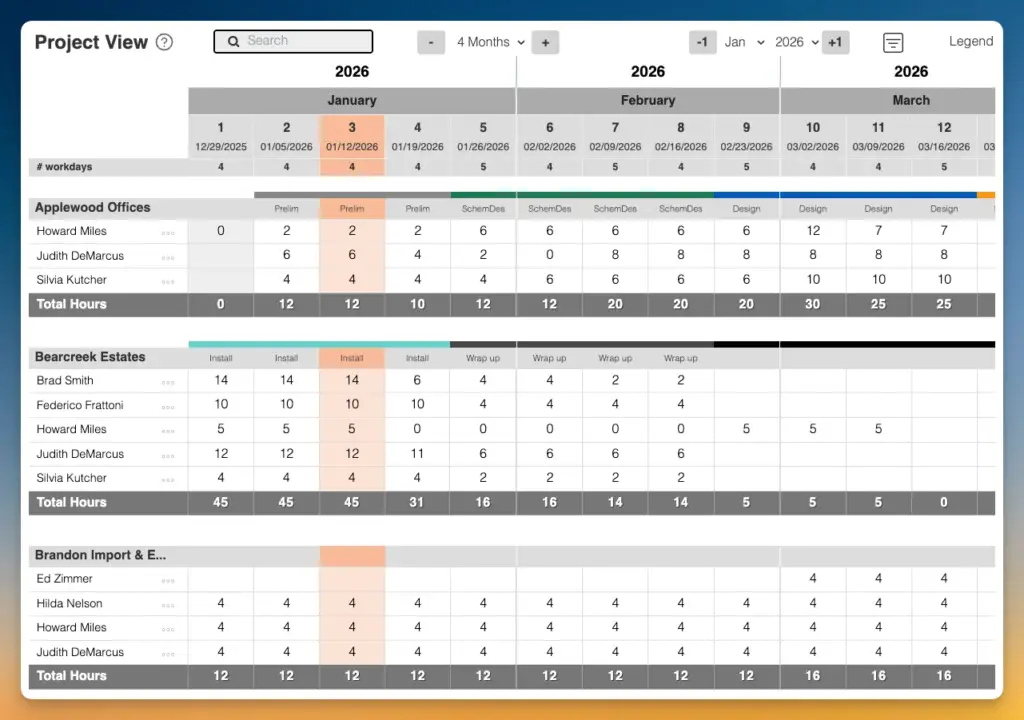
Project View shows all active projects in one view, together with the assigned team members and the key milestones:
This creates one common reference point for “what’s in flight” and “what’s coming up,” without relying on a mix of spreadsheets and apps.
The setup uses a weekly calendar view, because week-level planning is enough to coordinate real work: which projects are active this week, which milestones are approaching, and where the team needs to align.
This also fits naturally into a weekly design meeting, where the studio can quickly review the week, confirm owners and coordinate the next steps across projects.
Visualizing phases
Each project moves through stages that require different people and different kinds of coordination. Studios can add phases to each project to reflect their process. These phases are shown in Project View:
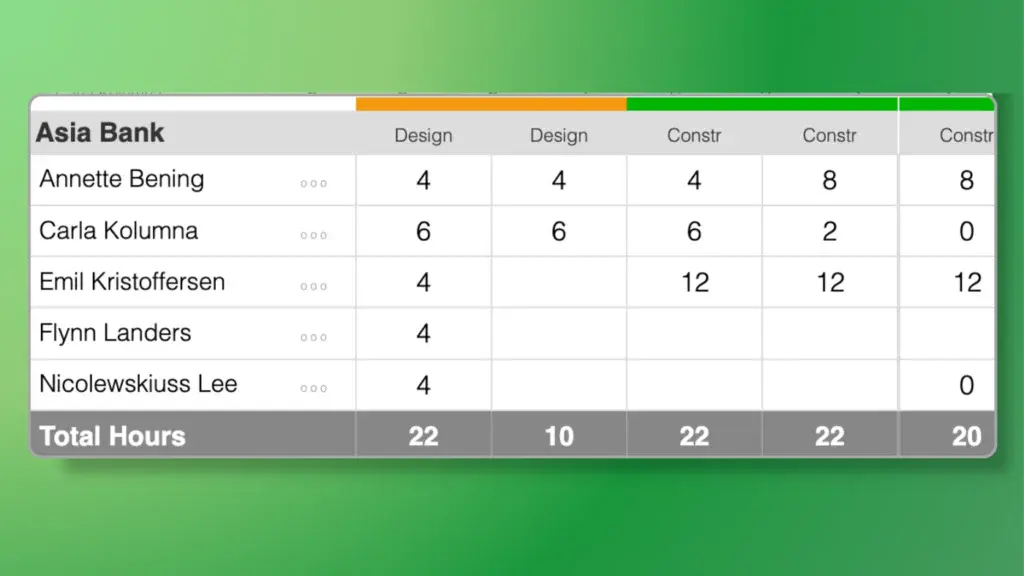
For design delivery, typical phases would include Preliminary, Concept, Concept Development, Design, Construction, Handover.
These phases sit under the project, so the Project View doesn’t only show active projects, but also what parts of the work are coming up.
In Caperity, phases can be color-coded, with each phase having its own color. That makes the project structure readable at a glance: it’s easier to scan a project and understand where effort is concentrated, and it becomes obvious when several projects are heading into the same type of work at the same time.
Milestones: What's coming next?
Design projects are milestone-driven: A client presentation, a design sign-off, install week. These events are what clients feel, and they drive the team’s next actions.
In many studios, these milestones used to live on a whiteboard. During our conversations, teams repeatedly asked for the same thing in software: milestones should be visible in one place, so people have them in front of them every day, not hidden in a document.
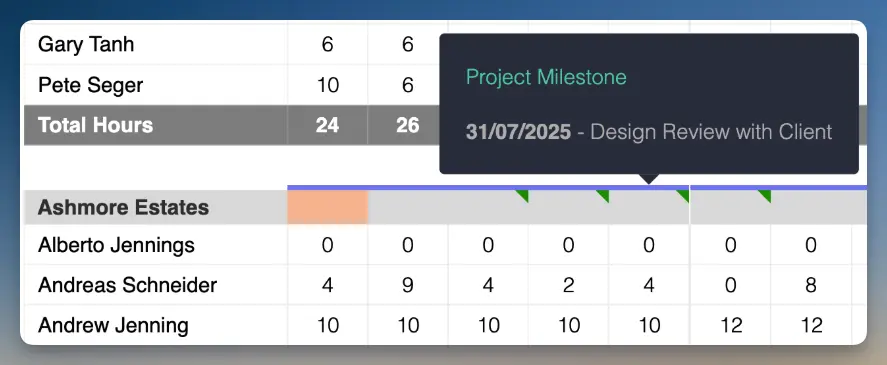
How we’ve solved this: Milestones can be added to each project and are shown in the Project View as a small rectangle. When pointing the mouse over the rectangle, the milestone details appear. Having the next delivery event visible like this encourages designers to plan ahead and prepare for the next checkpoint.
Seeing when team members are (un)available
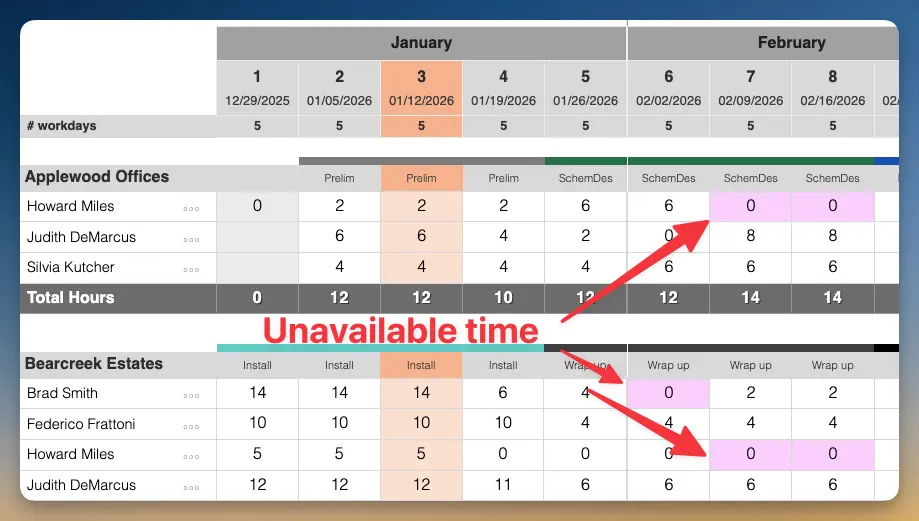
A weekly plan only works if it reflects real availability. That includes part-time schedules, but also time off like vacation or parental leave. Otherwise work gets planned into time that doesn’t exist.
A weekly plan only works if it reflects real availability. Time off like holidays, vacation, or parental leave needs to be visible. Otherwise work gets planned into time that doesn’t exist.
In Caperity, absences can be shown directly in the planning grid. That helps right away, because it’s clear when a key contributor won’t be around, before reviews and handoffs start slipping.
Even though planning is done by week, absences are tracked by day. When hovering over an absence, the exact days are shown. This avoids confusion, because “off this week” and “off Thursday + Friday” lead to very different planning decisions.
How busy are we, really?
Once projects and milestones are visible, the next question is capacity. Who has time, and when. The workload heatmap in Caperity shows available hours and planned workload per person, week by week. It makes workload visible:
This is how tight periods get caught early:
When planned hours start to exceed availability, it’s immediately visible which weeks are at risk and where the studio is stretching the same people too far. With that visibility, there is time to react.
Work can be reassigned, moved earlier, or shifted in timing. Extra support can be brought in. The goal is to keep delivery stable without pushing the team into crunch mode.
For studio directors, the same view answers a bigger question. Is this a one-off spike or a consistent pattern? That helps with decisions like when to use freelancers, when the pipeline supports hiring and where the studio needs more capacity long-term.
Who maintains the hours?
This is a common question. If every change has to go through one person, the plan becomes outdated fast or turns into a full-time admin job.
How we’ve solved this:
Team members maintain their own planned hours on the projects they work on – week by week. When a task takes more time, a client meeting is moved or new work comes in, the person closest to the work adjusts their allocation in Caperity.
Permissions make this secure: People can only edit their own hours, but they can still see the overall picture, including other team members’ allocations.
That visibility improves coordination while keeping the process simple. The delivery lead has the big picture, but the plan doesn’t depend on one person “moving the blocks” for everyone.
One interesting side effect studios have reported: When people maintain their own hours, accountability goes up. They take the plan more seriously and try harder to stick to the hours they planned.
Adrian has spent many years managing IT and business projects as a project manager. Today, he teaches project management and develops practical tools for project and resource management.