Are you trying to get a handle on capacity planning? Do you want clarity on who’s available, what your team can actually handle, and where the bottlenecks are?
It doesn’t have to be complicated, as long as you approach it methodically. The key is to start by understanding what you need, what metrics you want to track, and only then get into the actual setup.
In this guide, I’ll walk you through how to do that — from defining what to plan for, to structuring your data, and finally building your first plan. We’ll also look at capacity planning tools that have proven to be practical and easy to use.
Key Takeaways
Good capacity planning starts simple. Building the first version in Excel helps define structure, what data to track, and which metrics actually matter before moving to a tool.
A few setup choices determine how smooth the process runs. Setting the planning horizon, level of detail, metrics, and who’s included early on prevents confusion and rework later.
Real capacity is never the full contracted hours. Regular meetings, coordination, and context switching eat into productive time and should always be factored in.
Alignment makes or breaks planning. Keeping plans synced across teams prevents overloads, double-booking, and schedule conflicts.
The right tool depends on scale and project type. Smaller teams benefit from simpler tools like Caperity, while larger organizations rely on enterprise systems like Float to handle detailed scheduling.
What Capacity Planning Really Is
Capacity planning is about matching your team’s available time with the work ahead. It’s looking ahead and asking:
- Do we have enough people to handle the upcoming projects?
- Who’s already at their limit?
- When will things get tight?
In practice, it means mapping out who’s doing what, how much time they have, and where the bottlenecks are, so that projects move forward without overloading people.
Worth the Effort
Capacity planning done consistently has many advantages. You can make better decisions and projects are far more likely to succeed.
Here’s what changes:
- Better planning: Projects are scoped based on what the team can actually deliver.
- Fewer surprises: You can see bottlenecks early and take appropriate action.
- Less stress: People do better work when they’re not overwhelmed.
- Easier communication: With data in hand, you can show why something needs to wait.
One key point to keep in mind: Being perfectly accurate or hitting your capacity forecast 16 months out is not the goal. The goal is to have a simple system that shows you where things are heading.
The Two Components
Capacity planning has both a short-term and a long-term part. Both are important.
- Long-term planning gives you the big picture. Resource needs are forecasted across multiple projects that may span several months or even years. At this level, you block out time in broader periods to see how projects overlap and when new work can start.
- Short-term planning is more tactical. It focuses on the next few weeks and reflects the shifts that happen in day-to-day work. For example, tasks may get rescheduled or customers may raise additional requirements, requiring capacity adjustments.
Both levels work together and should be part of your planning process.
Upfront Decisions
Before getting into the details, it helps to define how the planning will be done. A few early decisions make everything that follows much simpler:
- Planning horizon
- Who you’re planning for
- Level of granularity
- Which metrics to track
Let’s go through each point.
Planning horizon
The planning horizon is how far you plan out. This depends on the type of projects:
- If your projects typically run for a few weeks, your planning will focus on that same short window.
- You’ll want to stay close to the action and adjust as things shift.
- If your projects stretch over several months or even a year, you’ll need a longer horizon to see how upcoming work overlaps and when key people become available again.
The rule is simple: match your planning horizon to the rhythm of your projects. You want to see far enough ahead to spot issues early, but not so far that the plan turns into guesswork.
Who You’re Planning For
Include everyone who contributes to your projects — not just the people on your direct team.
This is where capacity planning often gets complicated. Projects usually involve specialists from other departments, contractors, or freelancers who work part-time. Their time still counts toward your total capacity, even if you don’t manage their schedules.
When that’s the case, align your plan with theirs. Check allocations with their manager or main contact to confirm what’s realistic.
Shared people often appear in more than one plan, and that’s fine — as long as the data stays consistent. Regular syncs between teams help prevent double-booking and keep workloads balanced.
Level of Granularity
The right level of detail depends on the type of work and how your projects run.
- Work that involves tightly linked steps — like quality checks, client reviews, or production stages — requires finer planning. In manufacturing or other environments with physical output, daily planning is often necessary. Each step must align with the next, and small timing shifts can delay everything downstream.
- For long-term planning that spans months or years, broader time blocks are usually enough. The goal is to see when teams or roles will be needed and how projects overlap. Even then, your plan should stay consistent with existing schedules, especially if phases are already defined at a sub-week level.
Granularity also affects how much effort it takes to maintain the plan. If the process is new, start simple — weekly planning works well — and increase detail once you have a good system.
In short: match the level of detail to how tightly the work is connected. More dependencies need more precision; longer horizons need simpler views that still align with the overall schedule.
Another decision is whether to plan in hours or as a percentage of full-time effort (FTE). Both approaches work — the right one depends on how detailed your planning needs to be.
- Percentages (%) are great for high-level, long-term planning or when workloads fluctuate between projects.
- Hours work better when you need to plan specific tasks or short-term activities. What matters most is consistency: pick one approach and use it across all projects, so your numbers stay comparable.
Which Metrics Should You Track
Before setting up your capacity planning process or choosing a tool, decide which metrics to track. They determine the insights and reports you’ll get later, so it’s worth defining them early.
List the basic questions:
- How much time do we have available?
- How much of that time is already committed?
- Where are we overbooked or underutilized?
To answer those, you’ll need metrics such as:
- Available hours or days per person or role (after holidays, absences, and part-time adjustments).
- Allocated effort per project or activity — often in hours, days, or percentages.
- Remaining capacity: The difference between availability and allocation.
- Demand vs. Capacity: Hours of work planned (demand) versus maximum capacity
- Utilization rate: Total allocated time versus total available time.
- Project demand: Total effort required for each project or phase.
If your team bills time to clients, consider also these metrics:
- Billable hours: Total hours that can be invoiced to clients; you’ll understand how much of your team’s available time generates revenue.
- Billable utilization rate: Billable hours divided by total available hours; shows how efficiently your team’s time is being used for paid work (e.g., 75% billable utilization).
- Non-billable hours: Internal or support activities — things like meetings, training, or business development. Tracking these helps ensure they’re accounted for in capacity, even if they don’t generate revenue.
Once the basics are in place, you can build more advanced views — comparing planned versus actual effort, or grouping data by team, project, or role.
Knowing which metrics matter also helps when selecting a tool. Some are better for project-level forecasting, others for detailed resource scheduling. The metrics and reports you care about should guide that choice.
How To Keep Plans Realistic
When planning workloads, it’s easy to assume a full-time person is available for all their contractual working hours each week. In reality, that’s rarely the case:
- Regular meetings, admin work, and other ongoing tasks all take time away from project work.
- People also switch between projects, and each change in focus costs time and attention.
- A practical approach is to factor this overhead into your plan. If the nominal capacity is 40 hours, assume 30–32 hours are truly available for project work. The rest goes to coordination, meetings, and context switching.
Decide whether to plan based on maximum capacity (total working hours) or effective capacity (time available for productive work). With maximum capacity, set time aside for overhead; with effective capacity, that reduction is already built in.
Build a Planning Sheet in Excel First
If capacity planning is new to you, skip the tools at first.
Start by building your prototype in Excel. It helps you figure out how to structure the data, what to track, and what really matters for your planning.
This early version will save you time later. You’ll know exactly what to look for in a tool and avoid the frustration of discovering missing features after setup.
You don’t have to start from scratch — there are plenty of affordable templates available.
If you’re already using a spreadsheet and just want a more efficient tool, you can skip the next steps and go straight to the Tools section.
Putting It All Together
After the key decisions are made, start building your first capacity plan. Keep it simple and focus on the essentials — your team, your projects, and how they link together.
List Your Team Members
Create a list of everyone who contributes to your projects — full-time staff, part-time employees, contractors, and shared resources from other teams.
Add basic details such as their role, availability, and any known absences or holidays. This gives you the foundation for calculating capacity.
List All Projects
Capture the active and upcoming projects you want to plan for.
Include ongoing internal work too — things like support, maintenance, or meetings. Anything that regularly consumes time belongs in the plan.
Map People to Projects
Map team members to the projects to their assigned projects. If some role hasn’t been staffed yet, use placeholder resources (more on that below).
Using Placeholder Resources For Unfilled Roles:
When you plan ahead, you’ll often have projects where not every role is staffed yet. That’s where placeholder resources come in:
- Placeholders represent people you don’t have assigned yet, for example Mechanical Designer or Quality Specialist.
- They let you include upcoming work in your capacity plan without waiting until every position is filled.
When to use them:
- The project is confirmed but specific team members haven’t been assigned.
- When you know you’ll need extra capacity for a role in a future phase.
- When hiring or contractor onboarding is still in progress.
Enter the Allocations
Estimate the effort per project using your chosen unit such as hours or percentages.
Don’t aim for precision — rough allocations are enough to see where time goes and where bottlenecks appear.
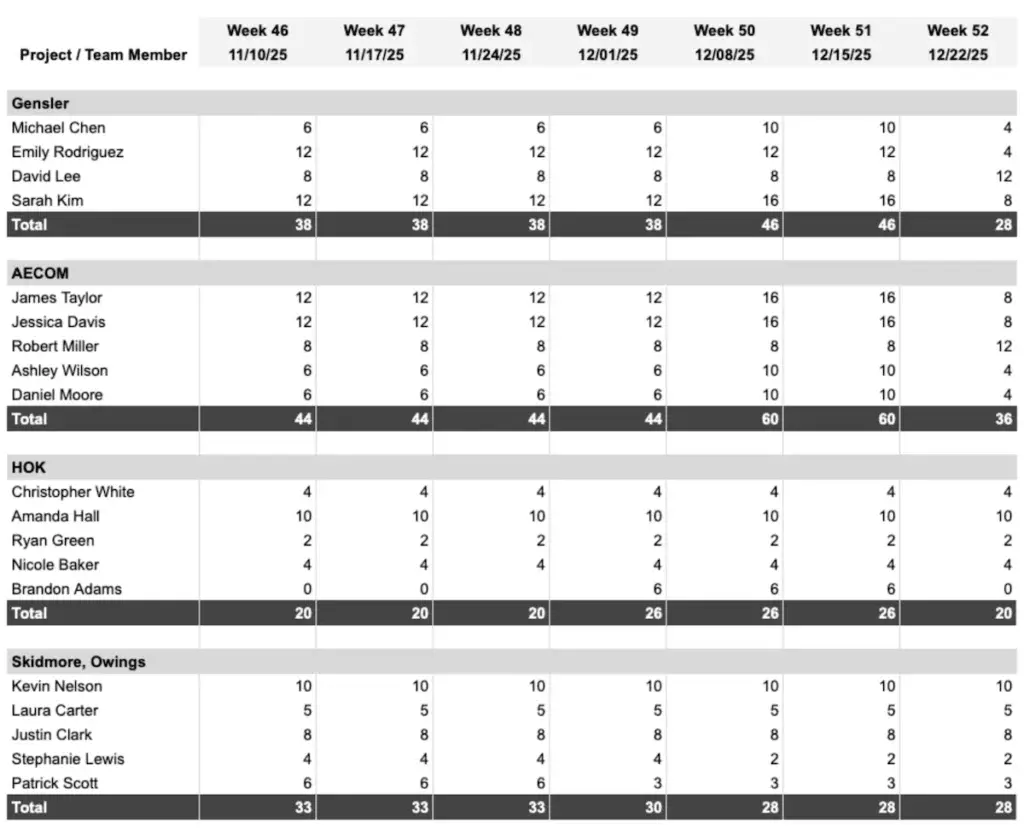
Here’s the sheet we ended up with:
Helpful Reports
Earlier we talked about useful metrics. Here are some examples of how they could appear in a report.
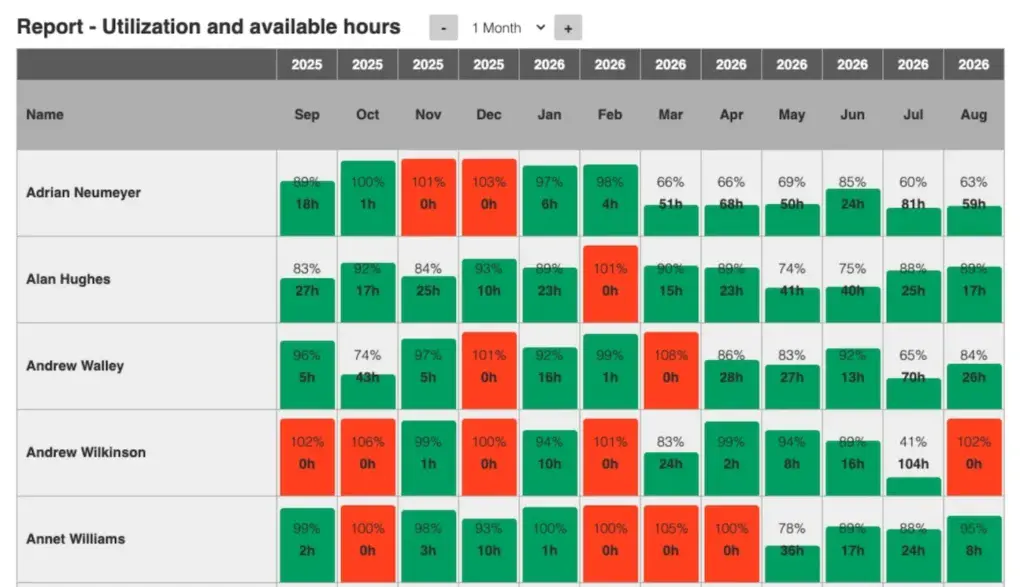
Team utilization report
This report shows how much of your team’s available time is scheduled for project work. It compares planned hours with total available hours to show workload as a percentage. It helps identify who’s overbooked or underutilized.
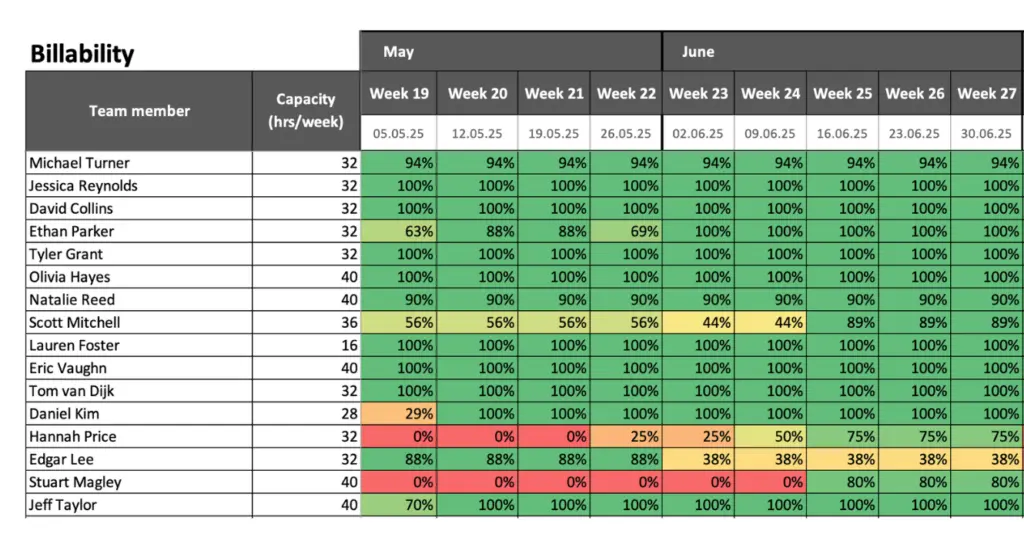
Billability report
A billability report tracks how much of a team’s available time goes to client work. Percentages show weekly utilization against each person’s capacity, with color coding revealing patterns at a glance — green for fully booked weeks, yellow for partial, red for low billing. It highlights where billable time drops off, helps spot underused roles, and keeps the team’s workload aligned with revenue targets.
Unlike a standard utilization report, the color scale here is reversed: green signals high billability, not free capacity
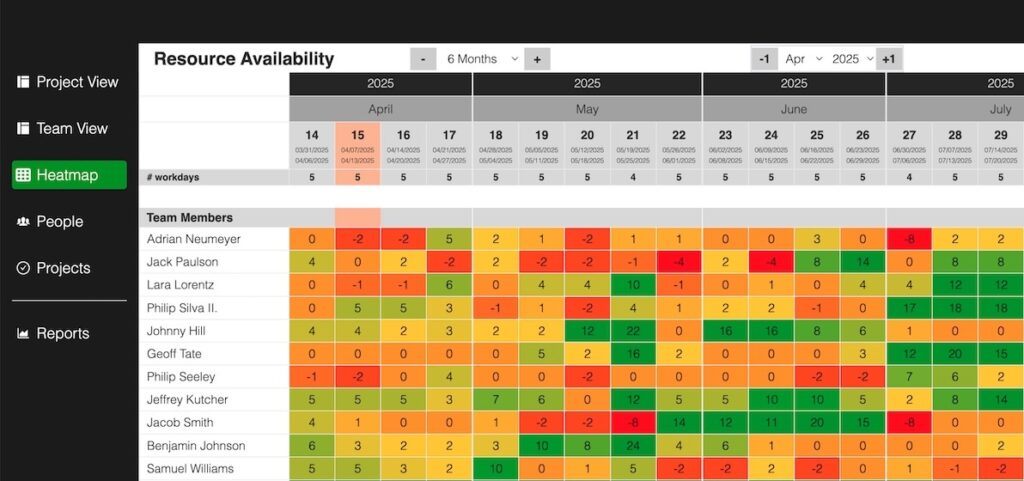
Availability Heatmap
An availability heatmap gives a quick visual of where capacity is available and where it’s tight. Color coding highlights busy weeks and free spots, making it easy to adjust workloads before running into bottlenecks.
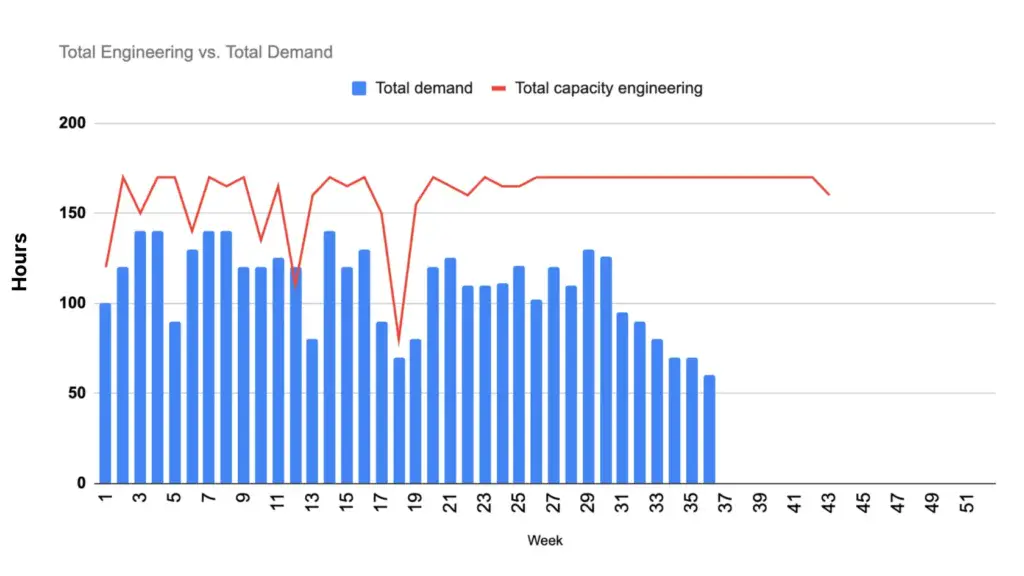
Capacity versus Demand Report
A capacity vs. demand report compares how many hours of work are planned (demand) against how many hours your team can deliver (capacity). It shows at a glance whether the workload fits within available resources or if upcoming periods are overbooked.
This view helps you identify where you’ll need more people, where capacity is underused, and how project timing affects resource availability — making it one of the most useful reports for long-term planning.
The chart shows a combined view of engineering demand and capacity for one year — a totals perspective that includes all projects and resources.
The blue bars represent total workload (demand) by week. The red line shows the team’s available capacity. Comparing the two helps identify when demand exceeds capacity and where free capacity exists later in the year.
Capacity Planning Software
Once you understand the basics, the next step is choosing a tool that fits your way of working.
In this section, we’ll look at a few options — from Excel templates to specialized capacity planning software. We’ll review how each one is structured, what functionality it offers, and the main pros and cons, so you can decide which approach makes the most sense for your team.
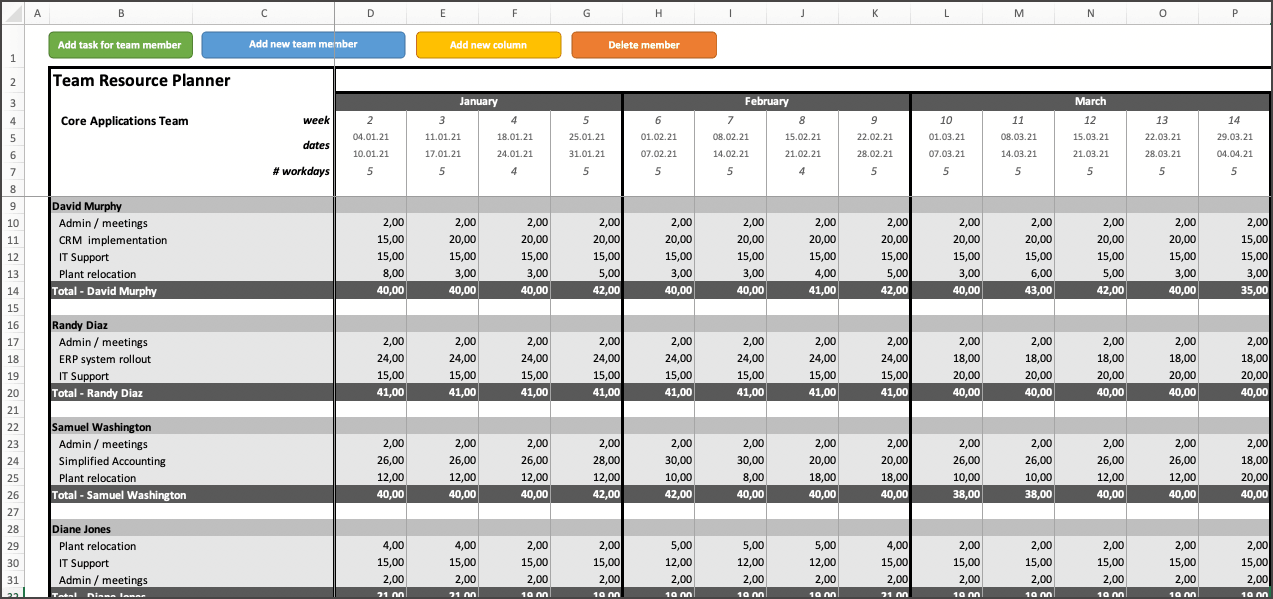
Excel Team Planner by Tactical Project Manager
A simple Excel-based tool for managers who want a simple way to plan individual hours and manage workload. It uses a weekly, calendar-style layout that shows hours grouped by team member, making it easy to see who’s available and when.
The built-in utilization report shows workload per week, giving a quick overview of capacity. It’s practical for tracking hours at the individual level, but doesn’t provide a project-level view of total hours.
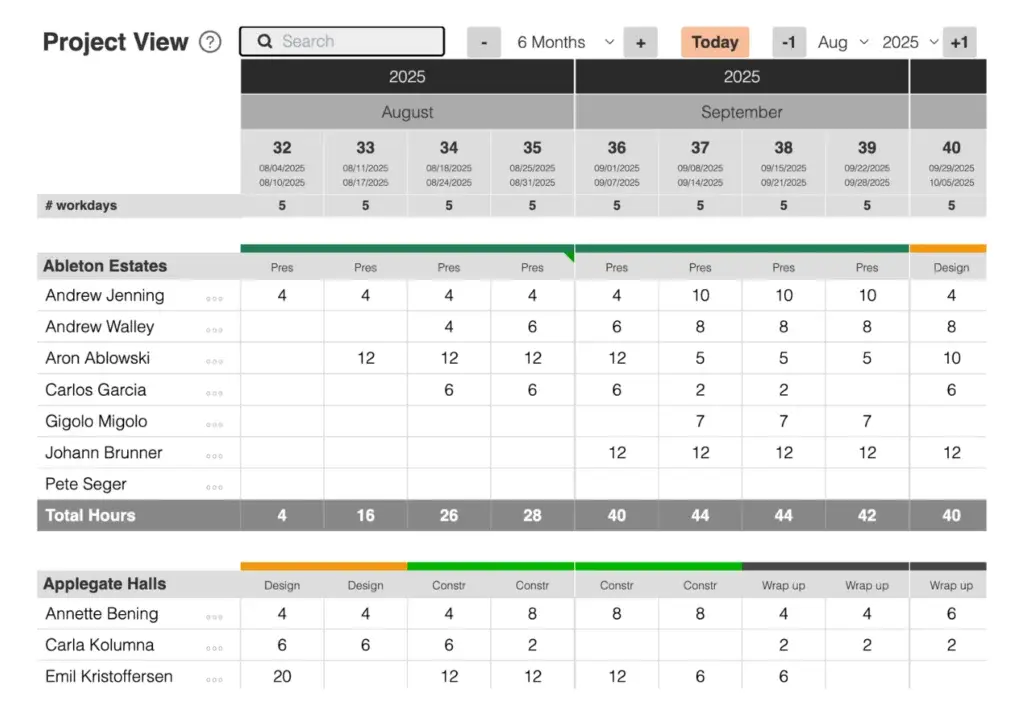
Caperity: Simple tool for smaller teams
Caperity is a simple, cloud-based planning tool designed for teams of up to about 30 people. It gives teams an easy way to manage workload and forecast resource needs without heavy setup.
It supports planning by week or by day — customers choose the layout that fits their planning. It’s a practical choice for smaller teams that want visibility and control without the overhead (and cost) of enterprise software.
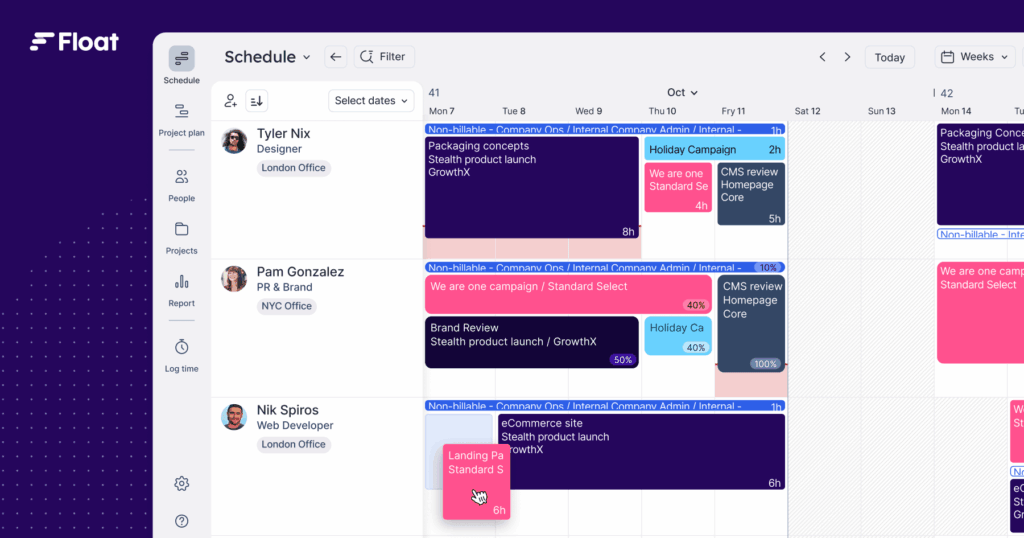
Float: Enterprise-level scheduling tool
Float is a popular resource management suite you’ll often see in bigger organizations – those with hundreds or even thousands of people. It supports detailed, hour-level scheduling. Time tracking is built in, and integrations with other enterprise apps like Jira or Outlook help to keep data consistent across the organization.
That functionality comes with some complexity, and managing the system takes ongoing effort.
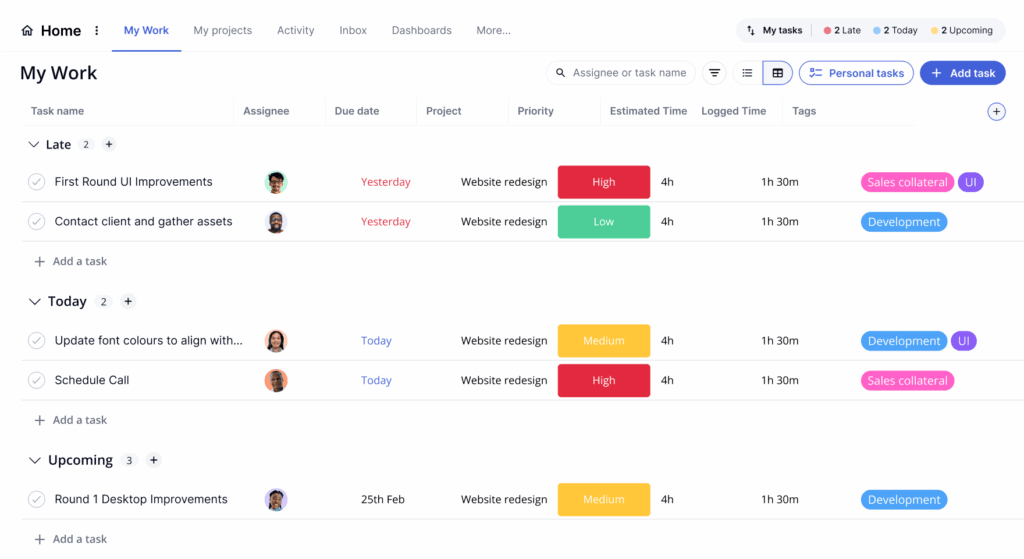
Teamwork: Popular among creative teams
Teamwork has been around for a long time and is a go-to tool for agencies and consulting firms where work is billed by time. It brings project management and time tracking together, with customizable reporting that helps teams keep both workload and profitability in view.
FAQs
How does agile capacity planning work?
Agile capacity planning focuses on shorter iterations and uses different metrics to estimate and plan workload. Check out our Agile Capacity Planning Guide for tips and examples.
What is capacity planning?
Capacity planning is about matching the time a team has with the work that needs to be done. It shows who’s busy, where there’s free capacity, and when new projects can start without overloading people.
How far should I plan ahead?
Six months is a good target for most teams. It’s far enough to see what’s coming but still close enough to reflect real schedules. Planning further out only makes sense at a high level since priorities can shift along the way.
Conclusion
Capacity planning isn’t about spreadsheets or tools. It’s about seeing the truth of how time is spent and using that insight to make better calls. When done right, it connects people, projects, and priorities in one clear picture.
The process starts simple: define what matters, track it consistently, and refine as you go. Over time, the numbers start to tell a story; where teams are stretched, where work piles up, and where opportunities open. That visibility is what keeps projects on track and teams happy.
Every organization does it differently, but the goal stays the same: match the work to the available time, not the other way around. Done consistently, capacity planning becomes less of a task and more of a habit that quietly keeps projects, budgets, and people in balance.
Author
-
Adrian has spent many years managing IT and business projects as a project manager. Today, he teaches project management and develops practical tools for project and resource management.
View all posts