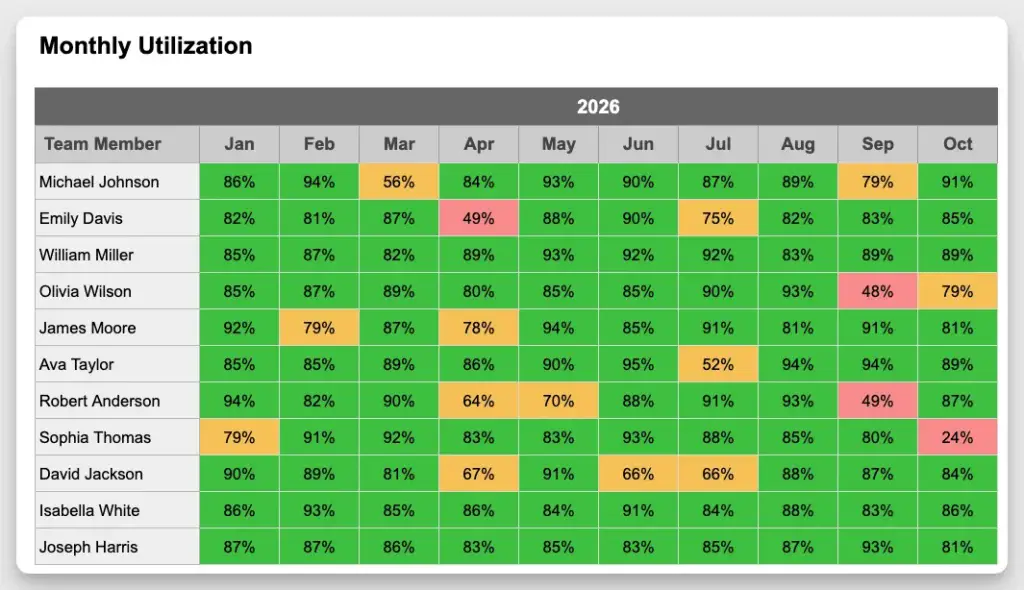
Resource utilization is a common term in project management, consulting and service-based teams.
You’ll hear it in planning meetings, reporting dashboards, and leadership discussions:
- “We need to increase utilization.”
- “Utilization is too low.”
- “We’re aiming for 80%.”
What exactly does it measure? How do you calculate it? And how useful is it in practice?
That’s what we’ll cover in this article.

What is resource utilization?
Resource utilization measures how much of a person’s available time is actually used for work. In simple terms, it answers one question:
How much of someone’s capacity is being used?
If a person works 40 hours per week and is assigned 32 hours of work, their utilization is 80%.
It’s a simple ratio and that’s why it’s such a popular metric.
Calculating resource utilization
The basic formula is very simple:
Utilization = Planned or worked hours / Available hours
You can apply this at different levels.
For an individual, you compare assigned hours with their available time. For a team, you sum up total capacity and planned work.
For example, if you have a team of 5 people with 40 hours each, your total capacity is 200 hours. If 150 hours are planned, utilization is 75%.
There are also variations depending on how teams work:
- Planned utilization: based on scheduled work
- Actual utilization: based on tracked time
- Billable utilization: only counting billable work (common in agencies)
Why resource utilization is useful
Utilization gives you a quick signal about how your team is being used.
It helps you understand whether people are fully booked, underutilized or overloaded. For service-based teams, it’s also directly tied to revenue and profitability.
If your team is consistently at 60% utilization, you likely have unused capacity. In other words, you are not making as much revenue as you could.
If it’s at 95% or more, you’re probably running at the limit, with little room for changes or unexpected work. BAU and unplanned tasks can quickly derail schedules and lead to milestones being missed.
Because it’s easy to calculate and communicate, utilization is often one of the first metrics teams track.
See a more extensive overview of resource management metrics and KPIs.
Where utilization becomes misleading
Uilization is sometimes misunderstood or overused.
One common mistake is aiming for maximum utilization. While it sounds reasonable to keep your team as busy as possible, the problem is it leaves no buffer for unexpected things. Critical projects lose traction because team members get distracted with other, temporarily more urgent tasks.
Another issue is that utilization ignores timing. A person may have 40 hours planned in a month, which is fine on average. But if all those hours fall into a single week, that person is likely overloaded — even though utilization looks fine.
Example: Why utilization alone is misleading
Imagine a person with an average utilization of 80%. On paper, that looks good.
But if you break it down by week, the picture changes:
- Week 1: 50%
- Week 2: 120%
- Week 3: 70%
- Week 4: 80%
The average hides the problem: In reality, the person is underused one week and overloaded the next. This is why utilization alone is not enough to manage workload effectively.
Finally, utilization doesn’t explain why something is off. It tells you that there is too much or too little work, but not which projects are causing it or when the problem occurs.
To make it useful, utilization should be viewed together with other reports, such as project resource allocation, which show how work is distributed over time and across projects. This adds the timing context that utilization alone is missing.
It’s also important to look beyond high-level utilization, such as monthly averages. These can smooth out the data and hide what’s really happening day to day. Looking at utilization on a weekly basis helps you spot when work actually peaks, and where gaps appear.
How tools help to track utilization
At some point, managing utilization in spreadsheets becomes difficult. You can calculate the numbers, but it’s hard to keep them updated and connect them to actual projects.
What teams often need instead is a clearer view of workload:
- how work is distributed over time
- where overload happens
- how plans change as projects evolve
In practice, it also helps to define utilization targets, for example:
- below 70% → underutilized
- 70–85% → healthy range
- above 90% → risk of overload
Resource management tools like Caperity make this easier by using color-coded views. Workload can be highlighted in green, amber, or red based on these thresholds, so you can quickly see where action is needed without having to compile complex reports yourself.
Final thoughts
Resource utilization is a useful metric for measuring how busy a team is.
It helps you understand how much capacity is used, but not when, where, or why.
Used on its own, it can be misleading. Combined with a clear view of workload over time, it becomes a much more useful tool for planning.
FAQ
What is a good resource utilization rate?
A “good” utilization rate depends on the team, but many aim for around 70–85%. This leaves enough buffer for coordination, unexpected work, and changes, while still using capacity effectively. Aiming for 100% often leads to overload and unstable plans.
How do you calculate resource utilization?
Resource utilization is calculated by dividing planned or worked hours by available hours. For example, if someone has 40 hours available and is assigned 32 hours of work, their utilization is 80%.
Why can resource utilization be misleading?
Utilization shows how much capacity is used, but not when or where the work happens. A team can have “good” utilization on average while still being overloaded in certain weeks. That’s why it should always be looked at together with workload over time.
Author
-
View all postsAdrian Neumeyer has spent over a decade in project delivery, leading high-stakes strategic IT initiatives for major global engineering firms like Bosch and HILTI. He is also the Founder of Caperity, focused on giving managers a simple, practical solution for project capacity planning.