Is Microsoft Project a Practical Option for Capacity Planning?
Project capacity planning can be very time-consuming, so looking for tools to speed things up is the right step.
Microsoft Project is often considered as an option. But its complexity and strong focus on scheduling are not always fully understood.
In this article, we’ll look at how capacity planning works in MS Project, when it is useful, and when it might be more than needed.
Key Takeaways
Microsoft Project is a scheduling tool. Its capacity planning capabilities are tightly connected to the scheduling logic and cannot be used independently.
Capacity directly affects task duration. Adding or removing resources changes how long tasks take. This is how Microsoft Project works.
Microsoft Project works best for complex projects with many interconnected tasks. Project will automatically adjust schedules based on resource capacity.
For basic capacity planning in a delivery environment, Microsoft Project is usually too much, as keeping plans up to date requires significant manual effort.
It’s all About Resources
Resources are the core element for capacity planning in Microsoft Project. They represent available capacity.
Resources are typically people, but can also cover equipment, budget and other items.
Why should you use resources?
Create project schedules based on resource availability
Estimate project costs using standard rates (for labor and material)
Track actual costs based on the actual resource usage.
Factor in scenarios like part-time availability and other common scenarios.
Setting up Resources
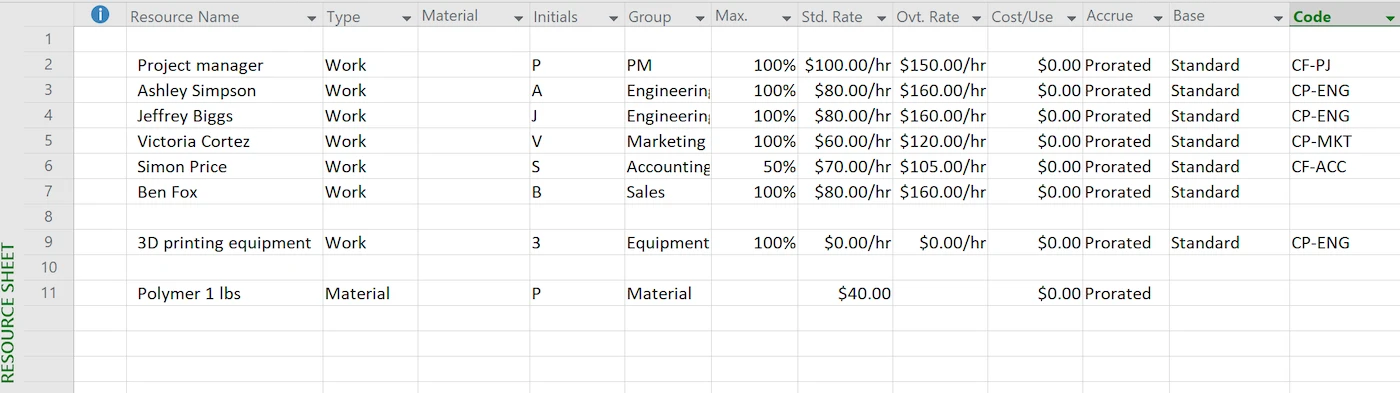
In Microsoft Project, all resources are managed in the Resource Sheet.
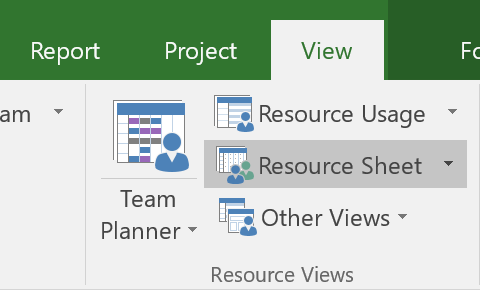
Click on View -> Resource Sheet:
This is the central place where you add and maintain your resources. Each row represents one resource—typically a person, but it can also be equipment or a generic role.
You define key information such as:
The resource name
The resource type (e.g. work, material, cost)
Group (or department)
The available capacity (e.g. 100% for full-time, 50% for part-time)
For each resource, you can define available capacity, such as full-time, part-time or limited availability. The latter is helpful for contractors.
Example 1: Suppose a project team includes full-time employees, a part-time designer working 50% and a contractor available only on Thursdays and Fridays.
Use calendars to define when people are available, including working hours and time off. Separate calendars can be used to reflect local holidays for team members in different regions (learn more about calendars in Microsoft Project).
Example 2: Suppose you have team members in the US and Mexico. Separate calendars can be used to reflect different public holidays, so availability is calculated correctly.
Fields like Group or Code are useful for organizing resources and allow reporting by team, department or other categories.
Example 3: An organization may have departments like Engineering, Marketing and Operations. Group keys or codes allow you to analyze availability and hours by department.
Capacity Planning Happens Through Task Assignments
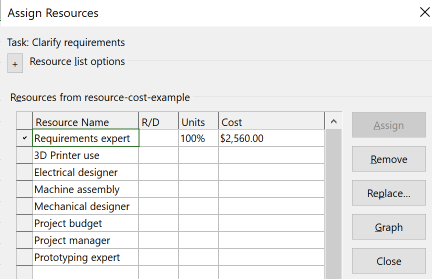
Once team members are defined, they are assigned to tasks.
This step is critical.
To have Microsoft Project track resource allocation and capacity, people must be assigned to tasks.
What happens behind the scenes: The effort defined for each task is distributed across the assigned resources, reducing their available capacity accordingly.
Capacity Drives the Schedule
One concept that confuses beginners in Microsoft Project is that changes in resource assignments automatically shift task durations and dates—even if the work itself stays the same.
This happens because, in Microsoft Project, capacity directly drives the schedule.
The amount of work defined for a task is distributed across the assigned people. Based on their capacity, MS Project calculates how long the task will take. At the same time, this work consumes their capacity.
To put it simply:
Adding more people to a task shortens its duration
Removing people extends the schedule
So the key point is: In Microsoft Project, capacity is not planned separately. It determines how the schedule is calculated, and the schedule shows how that capacity is used.
Using Project for Capacity Planning
Microsoft Project can be a reasonable option when the primary focus is detailed task scheduling and capacity should be managed automatically as part of the process.
When it’s useful
Detailed project scheduling is needed: When building and managing a complex timeline with tasks with dependencies is a core requirement.
Work is divisible: Tasks can be split across multiple people, and adding or removing resources directly impacts how fast work gets done.
Changes should update the plan automatically: When adding people, changing effort, or shifting tasks should immediately reflect in the schedule.
When it may not be a good choice:
The goal is mainly capacity visibility: When capacity should be easy to understand and communicate, without the overhead of a scheduling system.
Work changes frequently: When plans shift often and maintaining a detailed schedule becomes a burden.
Work doesn’t scale with more people: Adding resources does not proportionally reduce task duration.
Easy visibility and sharing are key: Capacity should be easy to understand and communicate, without the overhead of a detailed scheduling system.
In these situations, MS Project brings in more complexity than needed for the purpose.
Conclusion
Microsoft Project is first and foremost a scheduling tool, built to handle complex plans with many tasks and dependencies. Capacity management is part of that model—it works well alongside scheduling, but not as a standalone capability.
As a result, Microsoft Project makes sense when scheduling is the main goal and capacity needs to be tracked within that context.
If the goal is simple capacity planning, MS Project is the wrong tool. It introduces a level of structure and complexity that most teams do not need.
In these cases, lightweight solutions like Caperity are a better fit. They focus directly on capacity visibility and workload management without requiring a full scheduling setup.
Adrian Neumeyer has spent over a decade in project delivery, leading high-stakes strategic IT initiatives for major global engineering firms like Bosch and HILTI. He is also the Founder of Caperity, focused on giving managers a simple, practical solution for project capacity planning.