Simple resource planning for project/client teams

Plan work, see availability, and avoid overload — without a complex tool.

Caperity gives you a clear planning grid for hours, so you can staff projects confidently and spot overload early.

"Caperity is a great product"
Schedule projects easily

What is Caperity?

  • Caperity is a lightweight, cloud-based capacity planning tool.
  • Allocate people across projects and BAU, and see workload and availability in real-time.
  • Easy to use — works like a spreadsheet.
  • Just takes 5 minutes to set up. Simple monthly subscription.

Who is Caperity for?

Spreadsheets and other tools didn’t work for you. You need a simple way to plan people across projects and see individual workload and availability at a glance.

IT delivery teamsEngineering teamsPMOsNon-ProfitsAgencies

How it works

Getting started only takes 5 minutes

1
Upload projects and people
Import from a spreadsheet and set working hours.
2
Schedule work
Enter planned hours per project while seeing real availability.
3
Look ahead and adjust
Forecast resource availability and adjust workload to avoid bottlenecks.

Key features

Just what you need — without the complexity.

Planning grid
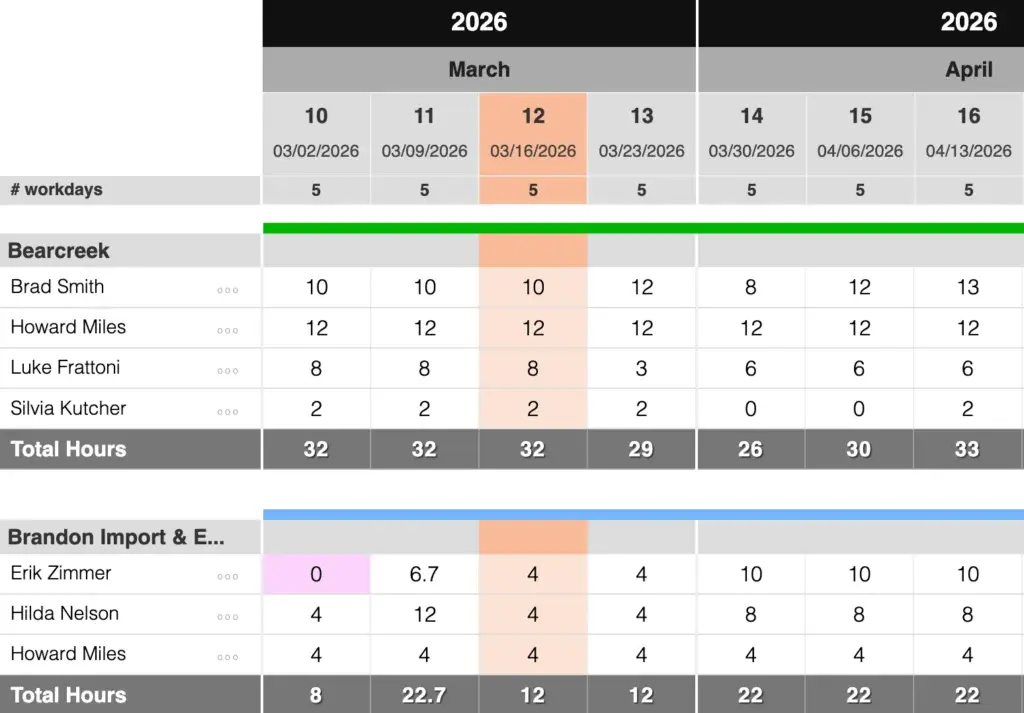
Assign hours quickly and see totals instantly.
Complete capacity model
Caperity factors in personal work schedules, holidays and time off — all managed in the app.
Daily or weekly calendar
Choose the granularity that matches your planning.
Overload indicators
Total workload and available capacity per team member are visible at one glance.
%
Reporting
Built-in reports provide a clear view of workload, utilization and allocation of resources.
🔒
Role-based access
Team members can easily update their own hours. Managers can manage the hours of their team.
Project phases & milestones
Add context in the planning view when needed.
Data import and export
Import hours, team members or projects from a spreadsheet. Export your planning data any time.

The main views

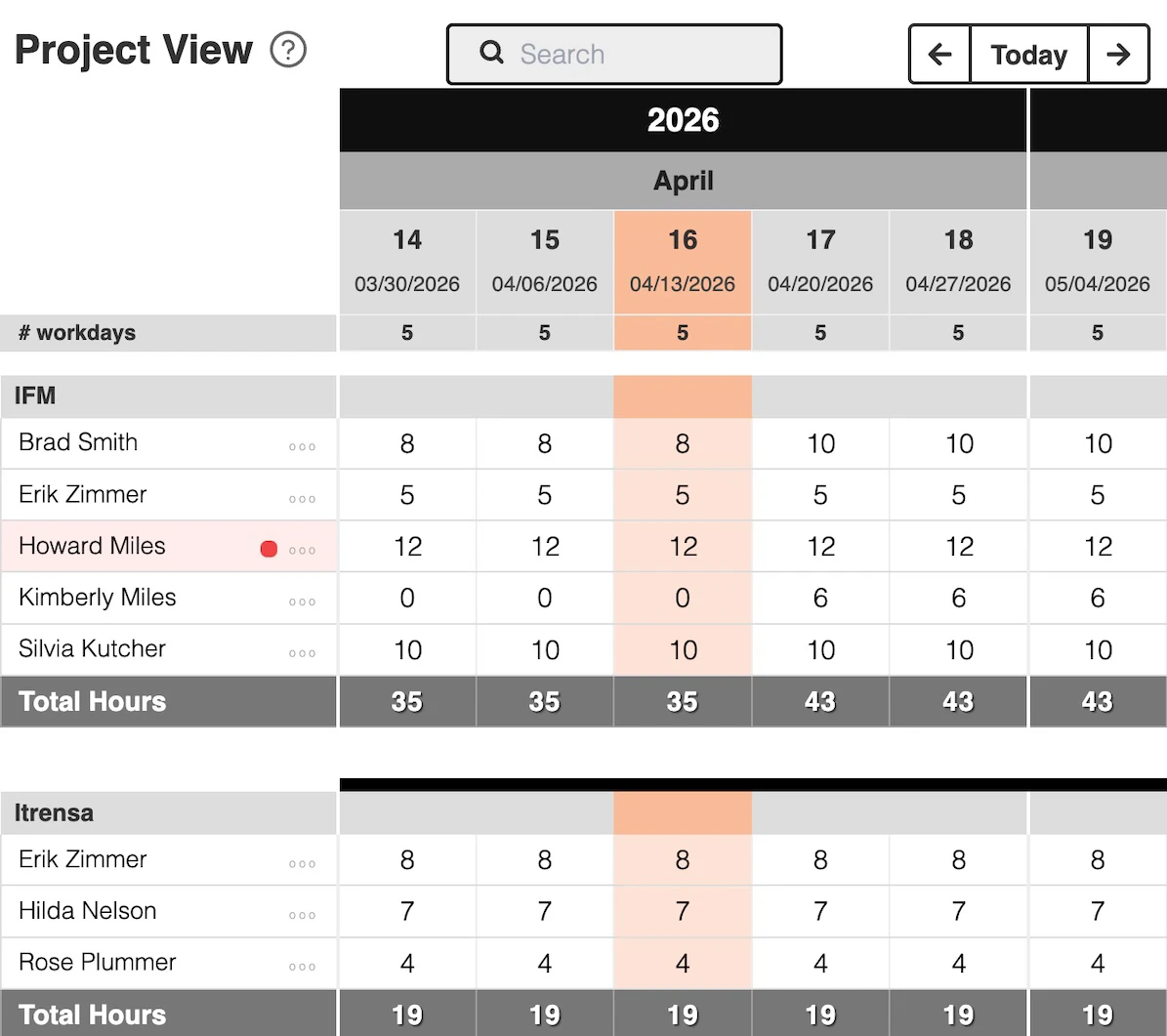
Project View

A centralized view of all projects with the assigned team members.

The Caperity software shows all your projects in one view, along with the assigned team members. You can also show milestones and project phases.
  • Plan work by entering hours into the grid
  • Import hours from a spreadsheet
  • Visualize phases and milestones
  • Apply filters (for example, by projects status)

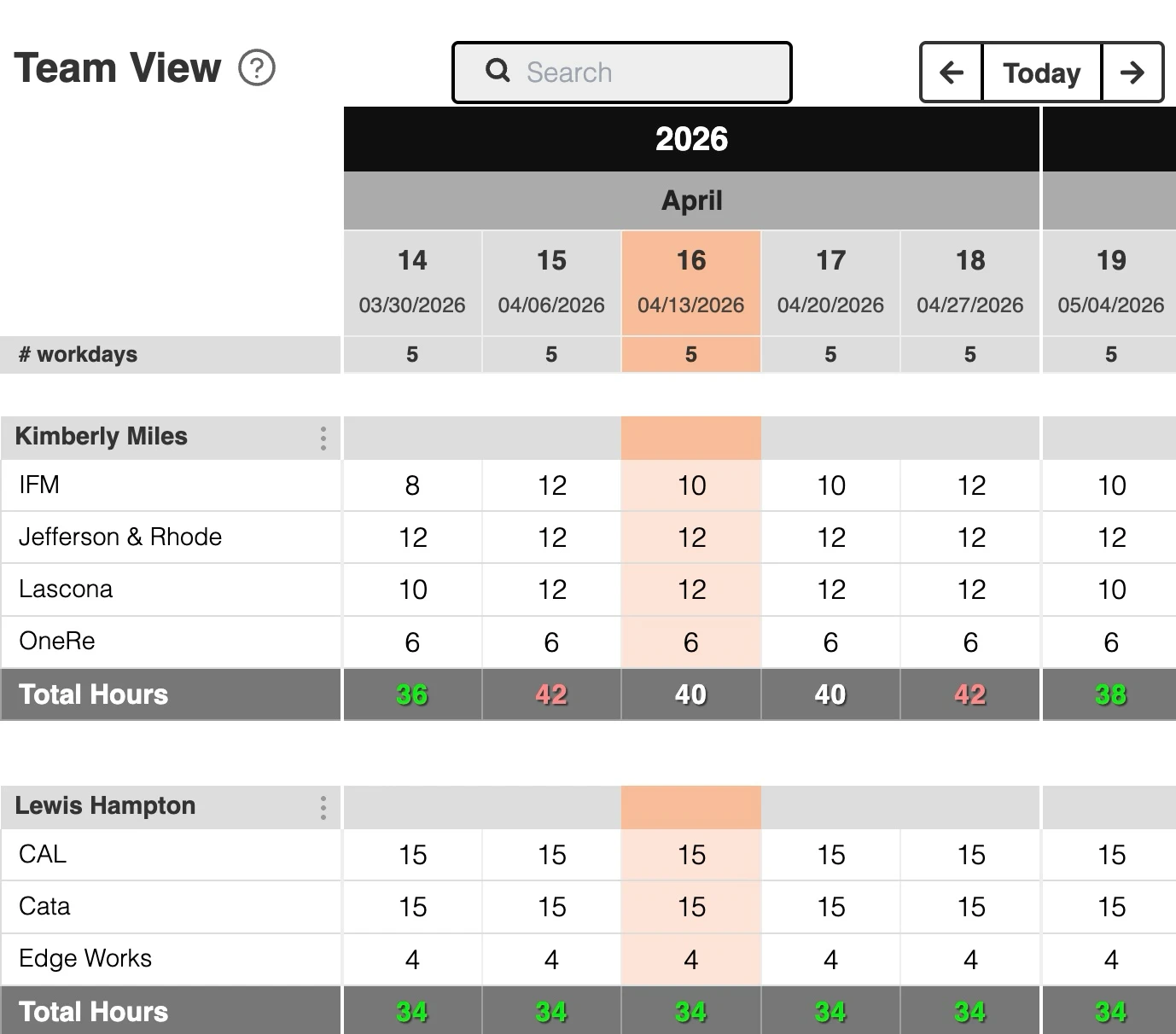
Team View

A centralized view of your team members, their assigned projects and total workload per team member.

View showing team resource allocation across weeks, with team members assigned to multiple projects. The view highlights overload and unused capacity through simple color coding.
  • Overbooking and unused capacity immediately visible
  • Red totals show overload. Green totals indicate available capacity
  • Capacity adjusts based on working hours, holidays and time off
  • Periods with reduced capacity are automatically highlighted

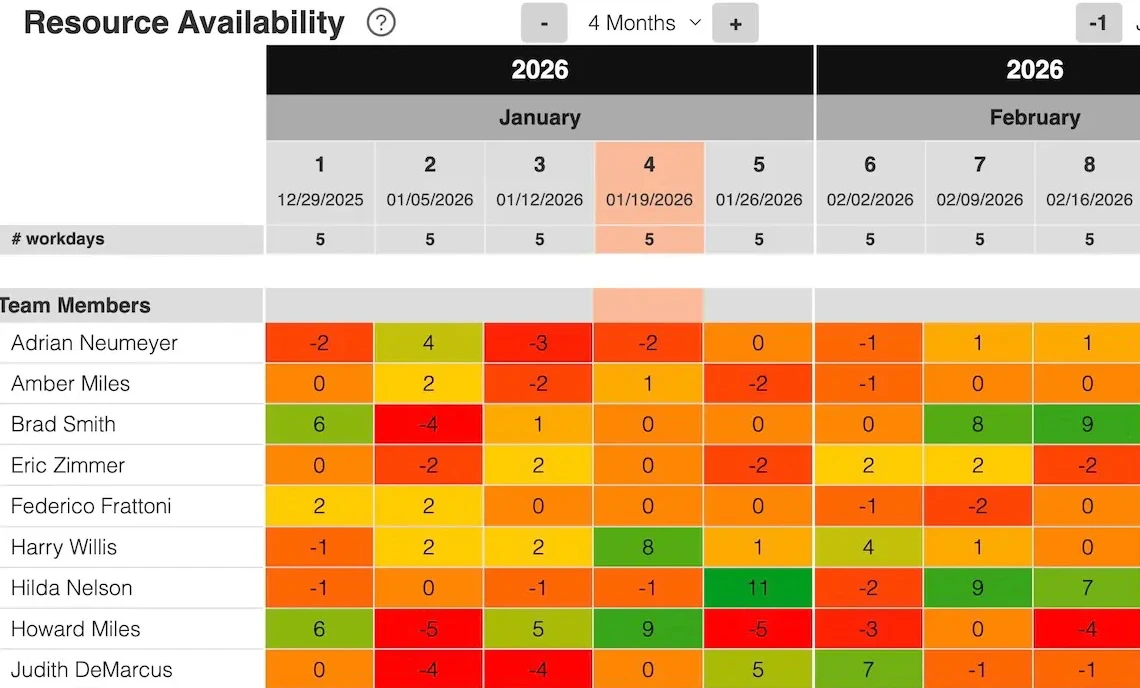
Resource Availability Heatmap

A complete view of future resource availability, so you can clearly see the workload for the coming months.

The integrated workload heatmap shows individual workload per team member, considering the assigned hours.
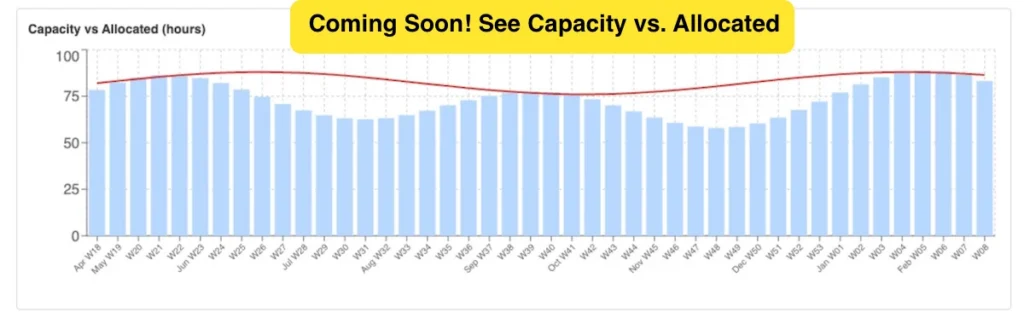
  • Workload is compared against individual capacity
  • Helps you spot bottlenecks early
  • Cell values show available hours (unused capacity)
  • Updates in real-time

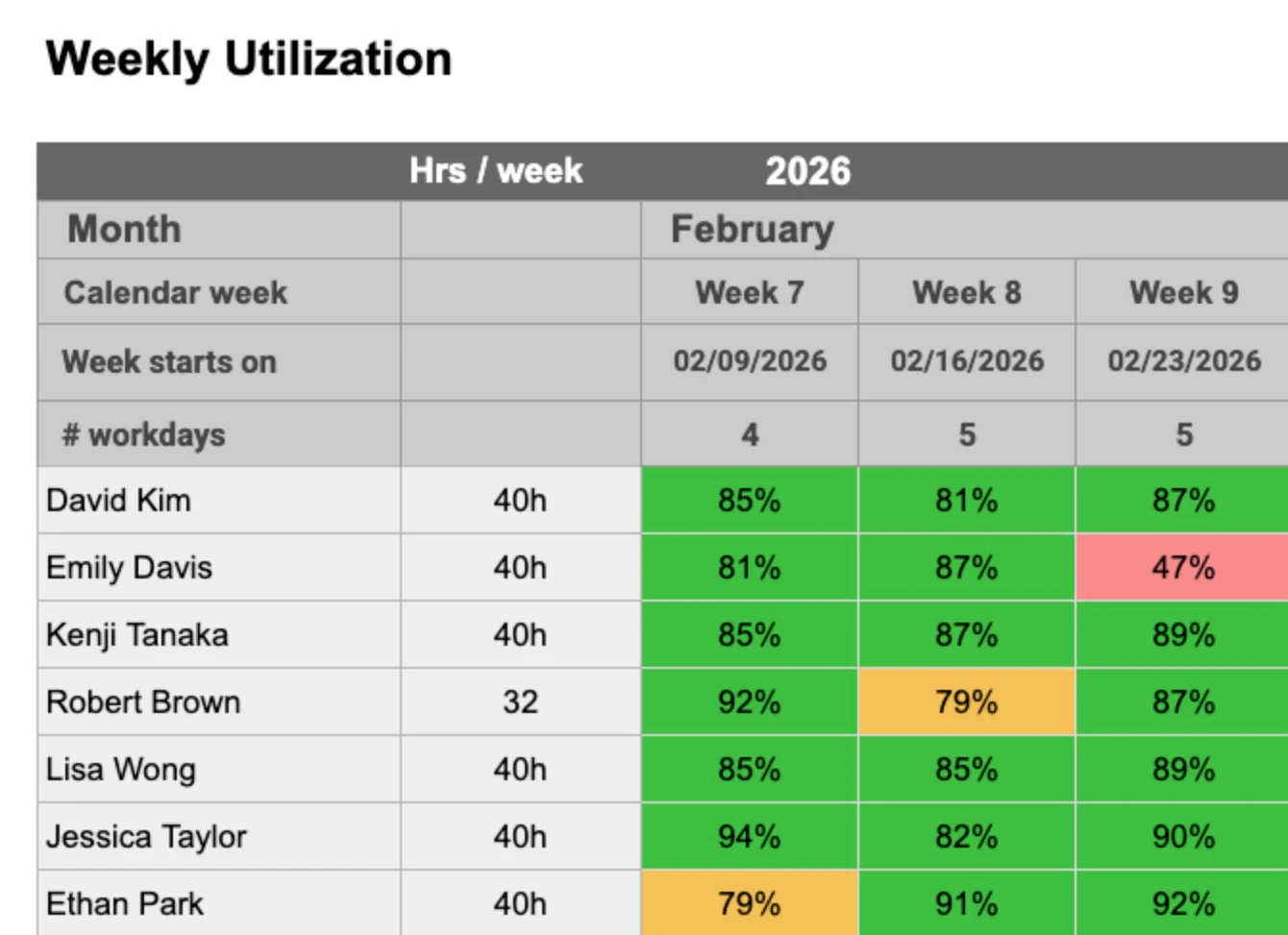
REPORTS

  • Monitor utilization or billability across weeks.
  • See instantly if the team is fully booked.
  • Set custom thresholds and colors.
  • Monitor utilization or billability across months.
  • See instantly if your team is fully booked.
  • Set custom thresholds and colors.
  • See total planned hours per project and month
  • See workload peaks early
  • Supports budgeting and forecasting
Report showing total hours per project.
  • See total planned hours by project
  • Updates in realtime
  • Supports budgeting
  • Shows allocation by person and project — expressed as a percentage of individual capacity
  • See which projects absorb the biggest share of team capacity
  • Spot suspicious fluctuations in capacity — caused by scope changes, delays or unexpected issues
  • Shows allocation by person and project — expressed as a percentage of individual capacity
  • See which projects absorb the biggest share of team capacity
  • Spot suspicious fluctuations in capacity — caused by scope changes, delays or unexpected issues

Quick Demo Video

FAQ

Caperity is a lightweight, cloud-based capacity planning tool for teams who work project-based or client-based.

Caperity is for teams that need a simple way to plan capacity across projects and BAU while clearly seeing availability. It’s not industry-specific. We have teams in IT delivery, engineering, consulting, non-profits and other areas who use it to plan their work.

No. Caperity is a cloud-based software. You access it via your browser.

Your data is stored securely on EU-based cloud infrastructure.

Yes, you can export your planning data at any time from within the app.

At the moment, Caperity supports hour-based planning only. We may add FTE-based planning in the near future.

Yes, Caperity supports two layouts: week-based and daily planning. The layout is selected during setup and applies to all projects. Switching between daily and weekly planning is not possible.

What users are saying

Your tool is so slick!

Caperity has quickly become an invaluable tool for us.

Our team members really like using Caperity.

What I really like about your tool is the ease and simplicity of it.

About Caperity

Photo of Adrian Neumeyer, a project manager who created Caperity, a simple resource management software for project-driven teams.

Caperity is the brainchild of Adrian Neumeyer, a former Project Manager who spent over a decade leading projects at engineering companies like Bosch and Hilti. He’s convinced that a project leader should be out there with the team, pushing things forward — not stuck in complicated tools. So he built a simple Excel solution for himself. It worked, others started asking for it, and over time it turned into Caperity: an easy-to-use capacity planning software now used by teams around the world.

Try an easier way of managing capacity